

Jump to: Quick comparison · Which one should you get? · What's new with V5 · Power consumption · Powering the V5 from a battery · Why the Mini still owns mobile · FAQ
Quick comparison: V5 vs V4 vs Mini

| Starlink Mini | Standard V4 | Starlink V5 | |
|---|---|---|---|
| Dimensions | 11.75 × 10.2 × 1.45 in | 23.4 × 15.07 × 1.5 in | 15.12 × 12.05 × 1.34 in |
| Dish weight | 2.43 lb (1.10 kg) | 6.4 lb (2.9 kg) | 2.4 lb (1.1 kg) |
| Avg. power draw | 20–40W (15W idle)* | 75–100W | 35–50W rated (~20W measured) |
| Peak download (hardware rating) | ~100–350 Mbps | 400+ Mbps | 375+ Mbps |
| Power input | Native DC (12–48V); USB-C PD compatible | AC PoE power brick | AC PoE power brick |
| Running from a battery | Direct (native DC input) | Needs an inverter or DC-to-PoE converter | Needs an inverter or DC-to-PoE converter |
| In-motion use | Yes (Roam plans) | No | No |
| Router | Built-in WiFi | Separate | Separate (Router Mini, PoE-powered) |
| Snow melt | Up to 25 mm/hr | Up to 40 mm/hr | Up to 40 mm/hr |
| Wind rating | 60+ mph | 60+ mph | Up to 165 mph |
| Weather rating | IP67 | IP67 | IP67 |
| Availability | Widely available | Widely available | US only at launch (Idaho, Montana, Oregon so far), Residential 100 Mbps plan |
Figures from Starlink's official V5 specification sheet and equivalent published specs for the V4 and Mini. Speed ratings are hardware peak figures; the plan you're on sets its own cap, and real-world speeds vary with location and network conditions.
*Real-world measurements from RV and off-grid users typically land in the 25–40W range under active use, with short spikes toward 70W under heavy upload. Our Starlink Mini power consumption guide breaks down what drives the draw.
Which one should you get?
Fixed home install, on-grid: Speed isn't the deciding factor anymore. Head-to-head on today's network, the V5 and V4 come out within a few Mbps of each other, because both are held back by the current satellites, not the antenna. So decide on what you actually care about. Want the higher ceiling for when faster satellites arrive, or the 200 Mbps and Max plans? Get the V4. Happy on 100 Mbps and want to run cooler on half the power? The V5 does that. One practical catch: most areas can still only order the V4 right now, with the V5 live in just a few regions, so what's available may make the call for you.
Off-grid cabin, homestead, or a boat at anchor: This is where the V5 gets interesting. Its real-world draw of around 20W is a solar-friendly number, and you can move the dish between home and a cabin by changing your address in the app, so a seasonal setup works even though it isn't rated for in-motion use. The catch is that it ships AC-only, so you'll want a DC conversion rather than an inverter to keep those efficiency gains. We cover the three ways to do this below.
Van life, RV, overlanding, boats underway, anything that moves: Mini, and it's not close. It's the only dish in the lineup rated for in-motion use. It also takes 12–48V DC natively and draws the least power of the three. The V5 changes nothing here.
Both worlds: Plenty of people pair a fixed dish at home with a Mini for travel. The V5 just made the home half of that setup cheaper.
What's new with the V5, and who it's for
On July 14, 2026, Starlink published the specs and install guides for its next-generation residential dish and opened ordering in a handful of rural US areas (Idaho, Montana, and Oregon at launch, with wider rollout expected as production ramps). At launch the V5 is tied to the Residential 100 Mbps plan, which runs $55/month in early areas. Hardware shows at $349 in Starlink's ordering flow, though early listings mix purchase and rental presentation ($10/month rental appears alongside the upfront charge in some areas), so treat pricing details as still settling.
One number needs untangling before anything else. The V5 dish is rated for 375+ Mbps, yet it launches on a 100 Mbps plan. Both are true: the first is the hardware's ceiling, the second is the service tier's cap. In the current ordering flow, the V5 is the hardware for the Residential 100 tier, while the larger Standard 4X remains the option for the 200 Mbps and Max tiers. Whether Starlink later offers the V5 on faster tiers is an open question.
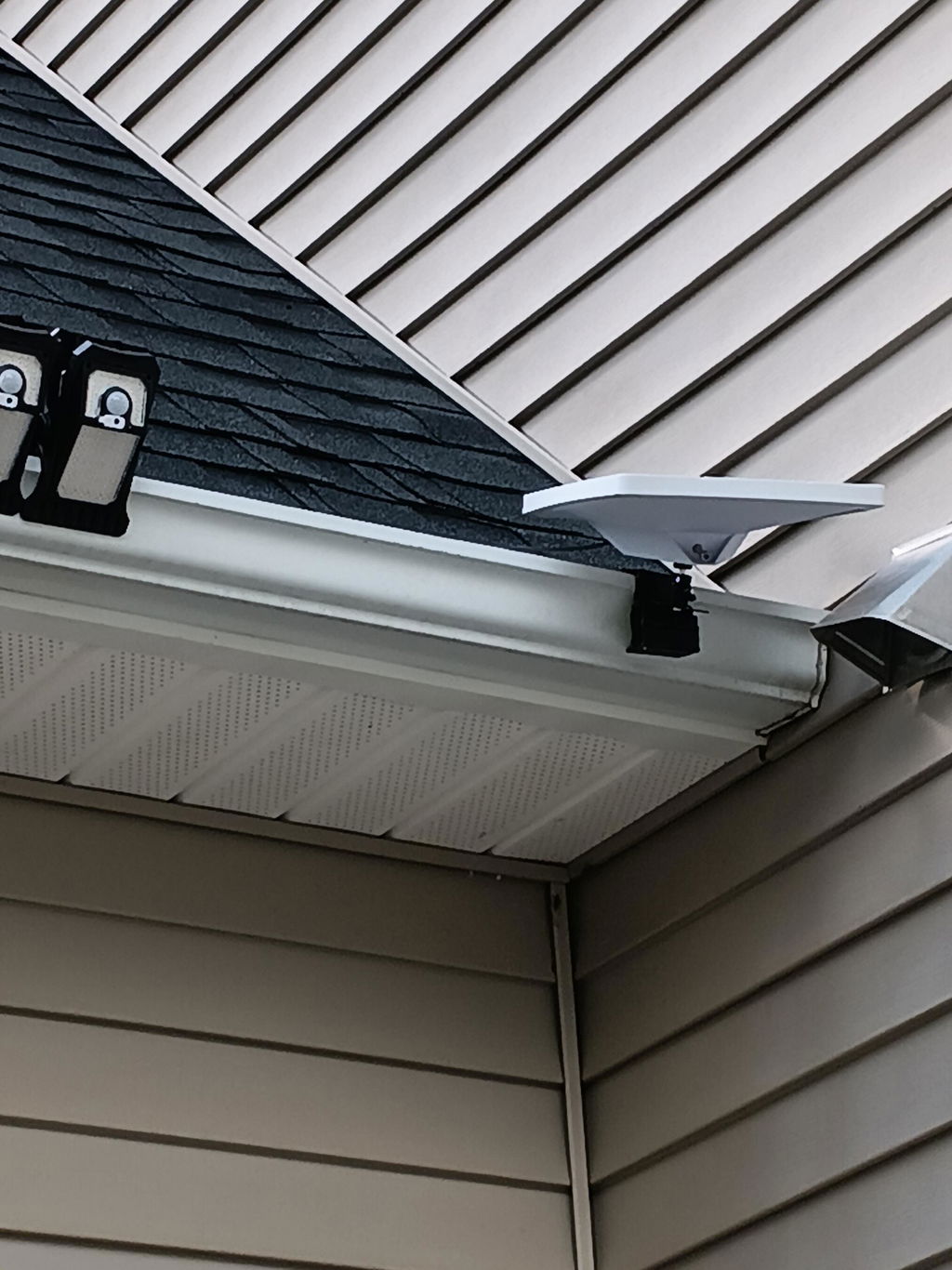
Here's the part that surprised people: that 375+ Mbps hardware rating is lower than the V4's 400+ Mbps. This isn't a performance upgrade. It's a manufacturing revision. Starlink trimmed the dish down to roughly what the network realistically delivers. In exchange, the dish shrank by 35% and lost 62% of its weight, and power draw dropped by about half. It's cheaper to build and ship, and simpler to install. The kit even includes a pipe adapter that clamps to standard metal poles, an accessory V4 buyers had to purchase separately.
The cleanest way to think about it: the V5 is the residential counterpart to the Mini, the budget-tier dish the US market never had. It slots between the Mini (~350 Mbps class) and the V4 as an entry option for fixed installs. If you already own a V4, or even a V3, there's little reason to swap a working roof unit.
The power story: about 20W in the real world
The V5's efficiency gain is real.Starlink rates it at 35–50W average, but independent testing has come in well below that. Hardware researcher Oleg Kutkov measured 7.9W at idle, a 20.7W median, and 44.2W peak, and other reviewers landed in the same 18–22W range for normal use. At around 20W, a V5 running around the clock uses roughly 0.5 kWh per day, versus close to 2 kWh for a V4. For an off-grid system, that's the difference between sizing a solar array around your internet and treating it as just another load. That makes it the most efficient fixed dish Starlink has shipped.
Here's what that draw looks like against common battery sizes:
| Battery capacity | Approx. V5 runtime |
|---|---|
| 100 Wh | ~4–5 hours |
| 300 Wh | ~12–14 hours |
| 1 kWh | ~40–45 hours |
Runtimes assume around 20W, the measured real-world draw, with direct DC power (no inverter losses) and snow melt off. Starlink's official rating is higher (35–50W), so if you'd rather plan conservatively, size for that instead. For your exact battery and dish, our Starlink runtime calculator does the math.
Two spec-sheet details worth knowing before you plan a system around those numbers:
Snow melt is extra. The V5 keeps the full 40 mm/hr snow melt capability, and that heater draws its own power on top of the average figure. Based on V4-platform measurements it pulls well over 100W when active (roughly 120W in our testing; Starlink hasn't published V5-specific figures). If you're in snow country on batteries, budget for it or disable it.
The wind rating is a quiet headline. 165 mph operational is hurricane-grade, territory that used to belong to Starlink's premium Performance hardware. For permanent mounts in harsh climates, that's a real upgrade over both the V4 (60+ mph) and the Mini.
Sleep schedule saves more. The Starlink app has a built-in sleep schedule that powers the dish down during set hours (say, overnight when nobody's online). On a battery or solar setup, scheduling a nightly sleep window is an easy way to stretch runtime further on top of the already-low draw.
Can you power the Starlink V5 from a battery?
Yes, and if you're off-grid, you should. The spec sheet doesn't cover it, so here's what actually works.
The V5 ships with an AC power brick that sends proprietary PoE up the dish cable, using the same architecture and cabling as the V4. We have the dish in hand, and the label settles the power question: 57V, 1.1A per port, model UTA-262. The brick is rated at a lower total output than the V4's, but the voltage is the same, so a DC-to-PoE converter built for the V4 feeds a V5 without modification. That gives you three ways to run one without grid power:

Method 1: Inverter (works, but wasteful). Run the stock AC brick from a 12V battery through an inverter. It's the zero-extra-hardware path, but you pay a double conversion penalty (DC to AC and back to DC) which typically burns 10–30% of your power before the dish sees a watt. On a dish whose whole appeal is efficiency, that stings.
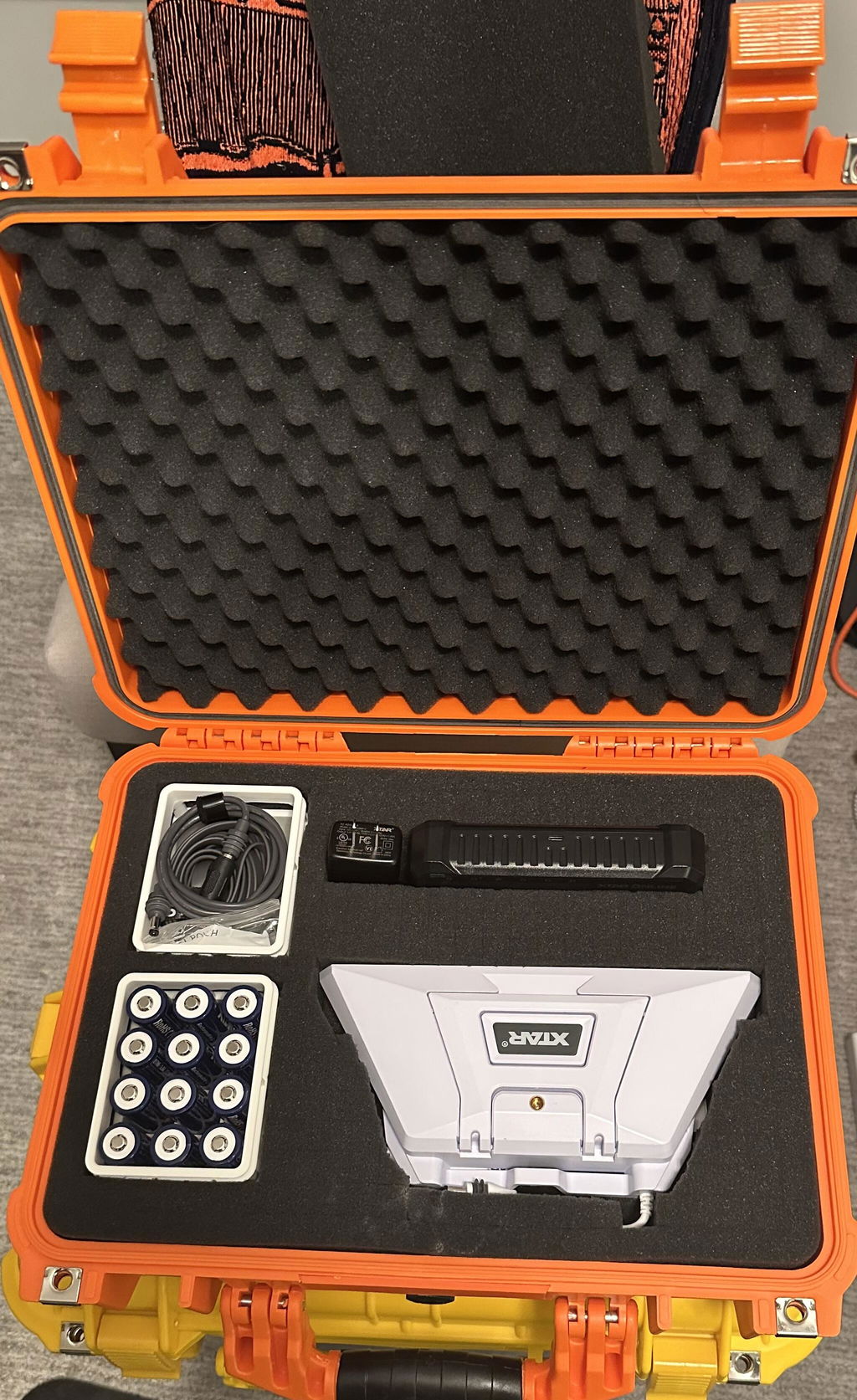
Method 2: Direct DC conversion (the efficient path). A DC-to-PoE converter replaces the AC brick entirely: your 12V or 24V battery bank feeds the converter, and the converter feeds the dish high-voltage PoE directly. No inverter, no double conversion. This is where the V5's low draw pays off. It's the approach we built the XTAR-Link EL6 V3 KT-V5 around.
It takes 10–30V in via Anderson connector (an O-ring-to-Anderson cable is included for battery terminals) and outputs 57V PoE to the dish, matching the label exactly, plus a LAN port and a regulated 12V DC5521 output, so a third-party router can run off the same unit instead of its own adapter. Which router to pair with it is a separate decision, and we go through the Router Mini, the Router 4 and third-party options in our Starlink V5 router guide.
Because your battery bank does the storing, capacity is whatever you've installed; a 200Ah LiFePO4 bank runs a V5 for days. Two honest sizing notes: feed it from at least a 12V/15A circuit (24V/10A is better), and don't run snow melt through a cigarette-lighter plug, since the heater's extra draw exceeds the typical 10A socket limit.
Method 3: All-in-one battery unit. Some users simply prefer a self-contained unit with a built-in battery and PoE output. There's nothing to wire into the vehicle or cabin electrical system, and it's often the fastest way to get online. The tradeoff is fixed capacity: when the built-in battery runs down, so does the internet, so it suits shorter sessions better than permanent installs. Our EL8 Pro is one example of this approach.
For most fixed off-grid installs, Method 2 wins on efficiency and capacity, and your existing solar charging keeps the bank topped up.
What the V5 doesn't change: the Mini still owns mobile
Despite the size similarity, the V5 doesn't move into the Mini's territory at all. If anything, it sharpens the split.
The Mini is DC-native. It accepts 12–48V directly and works with USB-C Power Delivery. There's no converter or inverter sitting between the battery and the dish, which is why it became the default for vans, RVs, boats and overlanding rigs. One caveat experienced users learn quickly: generic USB-C power banks can renegotiate voltage under load, which reboots the dish mid-session. A direct DC connection from a stable, purpose-built DC power source sidesteps the PD handshake entirely. We explain the mechanism in our Mini power consumption guide.
The Mini is the only dish rated for in-motion use. Starlink has confirmed the V5 is not. If you need connectivity while driving, on a boat underway, or a dish you can set on a picnic table in ninety seconds, the V5 was never designed for that job.
And on power, the Mini is right there with it: Starlink rates the Mini at 20–40W and the V5 higher, but in real-world testing both sit around 20W. For a small battery on a weekend trip, they're effectively a wash, so the Mini's edge is portability and in-motion use, not power draw.
Choosing between portable power options for a Mini? Our complete comparison of Starlink Mini power banks covers nine options, and the car adapter guide handles the in-vehicle side.
Our V5 is on the bench now. DC conversion results, snow melt numbers and anything Starlink publishes go out by email as we get them.
FAQ
Is the Starlink V5 replacing the Mini?
No. The V5 is a residential dish, AC-powered out of the box and sold at launch only on US Residential plans, with no in-motion rating. The Mini remains Starlink's only portable, DC-native dish that's rated for use in motion.
Can the Starlink V5 run on 12V?
Not out of the box, but yes with a DC-to-PoE converter. Your 12V/24V battery feeds the converter, which outputs the 57V PoE the dish uses (we read it off the label on our own V5). That's the efficient route; an inverter also works but wastes 10–30% in double conversion. Full breakdown above.
Can I use the Starlink V5 off-grid?
Yes. Its real-world draw of around 20W (below its 35–50W rating) is the lowest of Starlink's fixed-install dishes, which makes it viable on modest solar systems, provided you power it via DC conversion rather than an inverter and budget extra for snow melt if you use it.
Is the V5 more power-efficient than the Mini?
They're neck and neck. Starlink rates the Mini at 20–40W and the V5 at 35–50W, but in real-world testing both land around 20W. The V5's achievement is bringing full residential-class hardware down to Mini-level power draw.
Is the Mini slower than the V5?
On paper, slightly. The Mini tops out around the 300–350 Mbps class while the V5 hardware is rated 375+ Mbps. In practice both typically run well below peak, plan caps apply, and both are far more than enough for streaming and video calls.
Why does the Starlink Mini use less power?
It has a smaller phased array with fewer antenna elements, plus an integrated router. Its snow melt system is also lower capacity (25 mm/hr versus 40 for the V5). Less silicon pointed at the sky simply costs fewer watts.
Can I use the Starlink V5 in my RV?
Parked at a site, yes, with a DC conversion or inverter and a plan that permits portability. But it's not rated for in-motion use, so for anything that involves connectivity while driving, the Mini is the dish built for the job. This isn't only a software lock: the retail V5 leaves out the GPS chip that in-motion use needs, so no plan change unlocks it. For anything used while moving, the Mini is the dish.
Can I take the V5 to a cabin or a second location?
Yes, with a catch. The V5 can't be used in motion, but you can move it to another fixed spot and run it there by changing your service address in the app (US addresses only, and the change can take up to 20 minutes). Plan for two things. Change the address before you leave if your destination has no other internet, because the app needs a connection to update. And if your home address sits in a congested area, moving away and back can mean a waitlist or a congestion charge when you switch it back. One more note for seasonal users: the V5 doesn't support the $10/month standby pause, so between trips you either keep paying the full plan or cancel and reactivate each time.
Is the Starlink V5 worth upgrading to from a V4?
If your V4 is working, there's no speed gain to chase; the V4 has the larger antenna and the higher peak rating. The V5's case is lower power draw, plus the 165 mph wind rating. If one of those solves a real problem you have, upgrade. Otherwise keep the V4.
Does the V5's snow melt work on battery power?
It can, but plan for it. Based on V4-platform measurements, the heater draws well over 100W on top of normal consumption (V5-specific figures aren't published yet), which rules out cigarette-lighter circuits and thin wiring. Hardwire from a properly sized bank, or disable snow melt in the app.
Is the Starlink V5 compatible with existing V4 mounts?
Not directly. The V5 has a redesigned mounting attachment on the back of the dish, so V4-specific mounts won't fit as-is. The good news: every V5 kit includes a pipe adapter, so standard metal pipe mounts work out of the box, and Starlink's new home mount covers most fixed installs with a single part.
Can I replace my V4 dish with a V5 without rewiring?
Mostly, yes. Per Starlink's install guide, the V5 uses the same cable as the V4, so an existing cable run through a roof or wall can stay in place. What hasn't been confirmed is whether the V4 power brick can drive a V5 (Starlink hasn't published the V5 brick's specs), so plan on swapping the brick along with the dish until that's verified.
Can I buy the V5 outright instead of renting?
At checkout, the V5 usually shows as a rental only ($0 upfront, hardware stays owned by Starlink). But in our own experience, existing customers can request a one-time buyout through a Starlink support ticket. The buyout price is $349 (plus tax), it's handled as an account/billing action, and once complete you own the hardware outright with no obligation to return it if you later cancel service. If owning the kit matters to you, place the order first, then open a support ticket to convert it.
Is a new Starlink Mini coming?
Probably. A revamped Mini was teased alongside the V5 in a June 2026 interview, but Starlink hasn't published specs or a release date. Until it ships, the current Mini remains the only dish rated for in-motion use, and everything in this comparison stands. We'll update this post the moment official details appear.
Update log
This is a developing story. We'll correct and expand this post as Starlink publishes more information and as our own bench testing completes.
October 26, 2026: Our own V5 arrived and we read the dish label directly: 57V PoE input, 1.1A per port, model UTA-262. Earlier versions of this post carried 56V over as an assumption from the V4; it is now measured on hardware. Also pointed the EL6 link at the V5-specific kit and added a link to our Router Mini guide.
September 15, 2026: Added a note on buying the V5 outright — checkout shows a rental, but existing customers can request a one-time $349 buyout via support ticket, confirmed through our own purchase. Also added a tip on using the app's sleep schedule to extend battery runtime.
August 20, 2026: Revised the power figures to match real-world testing. Multiple independent measurements, including hardware researcher Oleg Kutkov's (7.9W idle, 20.7W median, 44.2W peak), now put actual V5 draw around 20W, well under Starlink's 35–50W rating, so the runtime estimates have been updated accordingly.
August 14, 2026: Added a travel/second-location section. Hands-on testing confirms the V5 can be moved to another fixed site and run there by changing the service address in the app (US only, up to 20 minutes to take effect), though it still can't be used in motion. Two caveats worth knowing: the app needs internet to change the address, so do it before heading somewhere with no other connection, and moving a congested-area home address away and back can trigger a waitlist or congestion charge. The V5 also doesn't offer the $10/month standby pause.
July 29, 2026: Independent testing of all three dishes side by side, same location and plan, now puts the V5 at about 278 Mbps average against the V4's 275, while pulling about half the power (22W versus 41W, both measured at light load; the table above lists Starlink's higher rated figures). On today's satellites the 375-versus-400 spec gap makes no real difference, since both are limited by the network rather than the dish.
July 28, 2026: Initial publication, based on Starlink's official V5 documentation published July 14 (spec sheet, install guide, accessory guide), a check of Starlink's live ordering flow, and early reporting. Known gaps we're watching: final purchase-vs-rental pricing, V5 power supply electrical specs, international availability, bench verification of DC conversion on a production V5 unit, and any word on a next-generation Mini.